Manage Payments
Collecting money from members. Requires the Payments entitlement, and is never offered to municipalities.
Connecting Stripe
Payments run on Stripe Connect. Your community onboards its own Stripe account, and money goes there rather than to CivicPort.
Three things have to become true before you can charge anyone:
| Signal | Meaning |
|---|---|
| Details submitted | Onboarding form completed |
| Charges enabled | Stripe will accept payments |
| Payouts enabled | Stripe will pay the money out to your bank |
Until charges are enabled the status shows pending, and publishing fees will not help. Finish onboarding first. A Stripe login link from this page takes you to your own Stripe dashboard for anything CivicPort does not surface.
Platform fee
Some communities pay CivicPort a small percentage of resident payments, taken as a Stripe application fee. Many pay zero, because platform invoicing is priced lower for communities that accept a transaction fee. Whichever applies to you was agreed before your community was created; it is not adjustable here.
Fees and dues
A fee is one charge definition.
| Field | Notes |
|---|---|
| Type | One-time, or recurring |
| Interval | Monthly, quarterly or yearly, on recurring fees |
| Allow annual | Lets members on a monthly fee pay yearly instead |
| Annual amount | The yearly price. Defaults to twelve times monthly; set it lower to discount paying up front |
| Due date | On one-time fees, what "overdue" is measured from |
| Category | Dues, fines, special assessments or other. Drives income reporting |
| Audience | Everyone, or assigned |
Categorise fees properly. Category is what your financial reports and budget break down by, and recategorising a year later does not retell the story you wanted at the time.
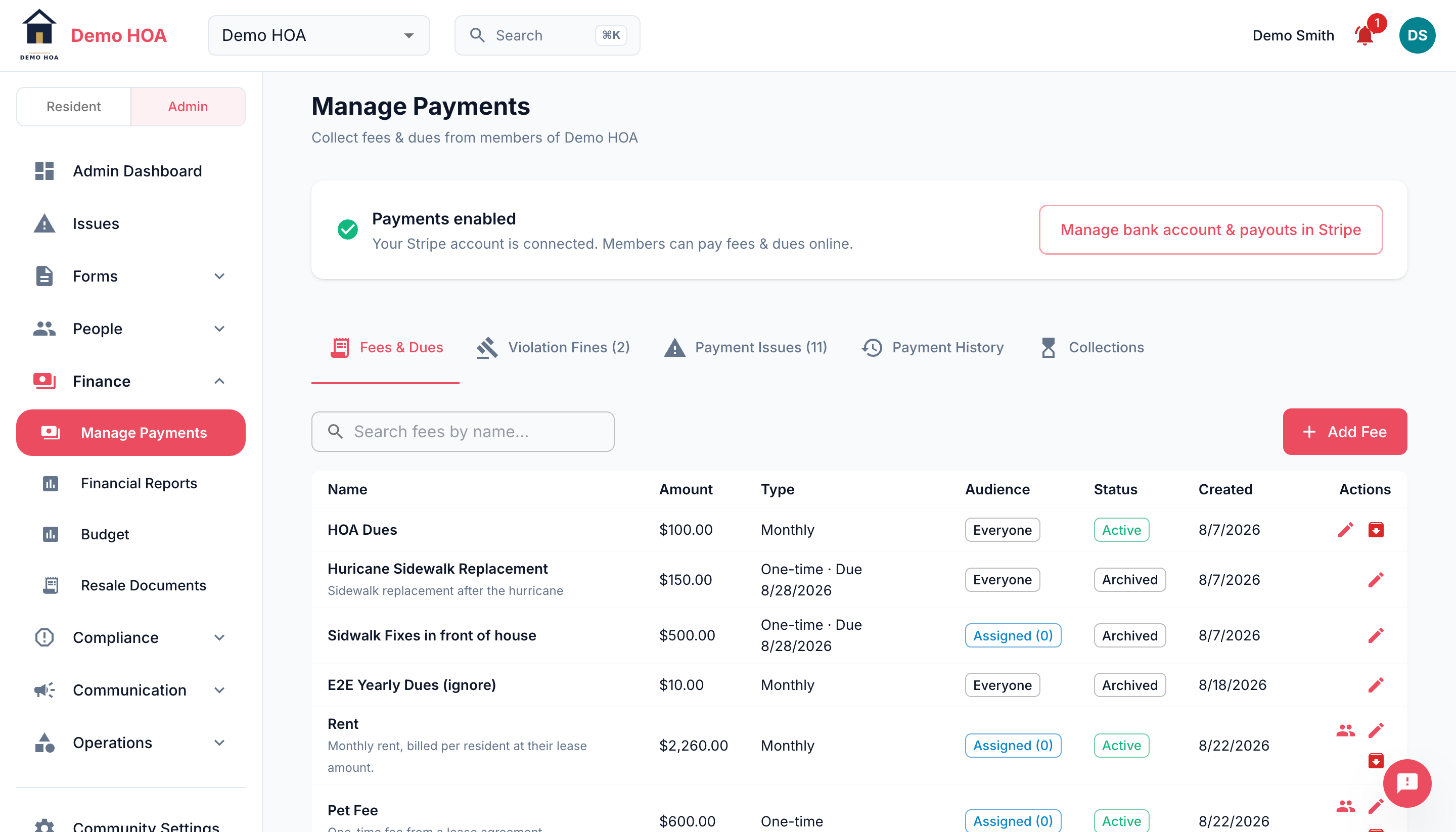 Everyone versus assigned, active versus archived, and the tab row carrying violation fines and payment issues.
Assigned fees
An assigned fee applies only to the members you name, optionally at a custom amount each. Use it for charges some homes owe and others do not, and for negotiated arrangements.
Assignments can be saved with the fee at creation or edited later. The fee list shows how many members each assigned fee covers.
Archiving
Archive a fee rather than deleting it. Archiving stops it applying going forward and keeps the history of what was paid against it, which is the record you need at audit and at closing.
Fines from violations
Attaching a fine to a violation creates a real fee automatically, categorised as a fine and linked back to the violation. It appears in the resident's payments alongside everything else.
Delinquency
The delinquency view lists, per fee, who is obligated, who has settled and who has not, with an overdue day count where a one-time fee is past its due date, and a total outstanding across the community.
This is the list you work from for collections, and the list a board wants before it sets next year's budget.
Payment history
Every payment, with status. The statuses worth knowing:
| Status | Meaning |
|---|---|
| Processing | Submitted, not settled. Bank debits sit here for days |
| Past due | A subscription charge failed |
| Refunded | Money returned to the payer |
| Voided | An bank debit stopped before it reached the bank. No money moved, so nothing is coming back |
| Reversed | An offline payment an admin reversed. The original entry, kept |
| Reversal | The signed-negative counter-entry that reversed one |
Refunded and voided are genuinely different, and confusing them is how a member gets told to expect money that was never taken.
Collections policy
Set a grace period, a late fee (flat or percentage), and the days past due at which escalating notices go out. Also set which offline methods you accept.