Manage Messaging
Who receives what, and how you send to many people at once.
Contact roles
A role is a topic residents can write to: Maintenance, Billing, Architectural Review, Pool. Each has a name, a description residents read when choosing, a sort order, and the admins assigned to it.
Two rules worth knowing:
- General always exists. It is the uncategorised thread and cannot be removed. Anything a resident could not classify lands there.
- A role with nobody assigned goes to every admin. That is a safe default and a poor operating model. Assign owners.
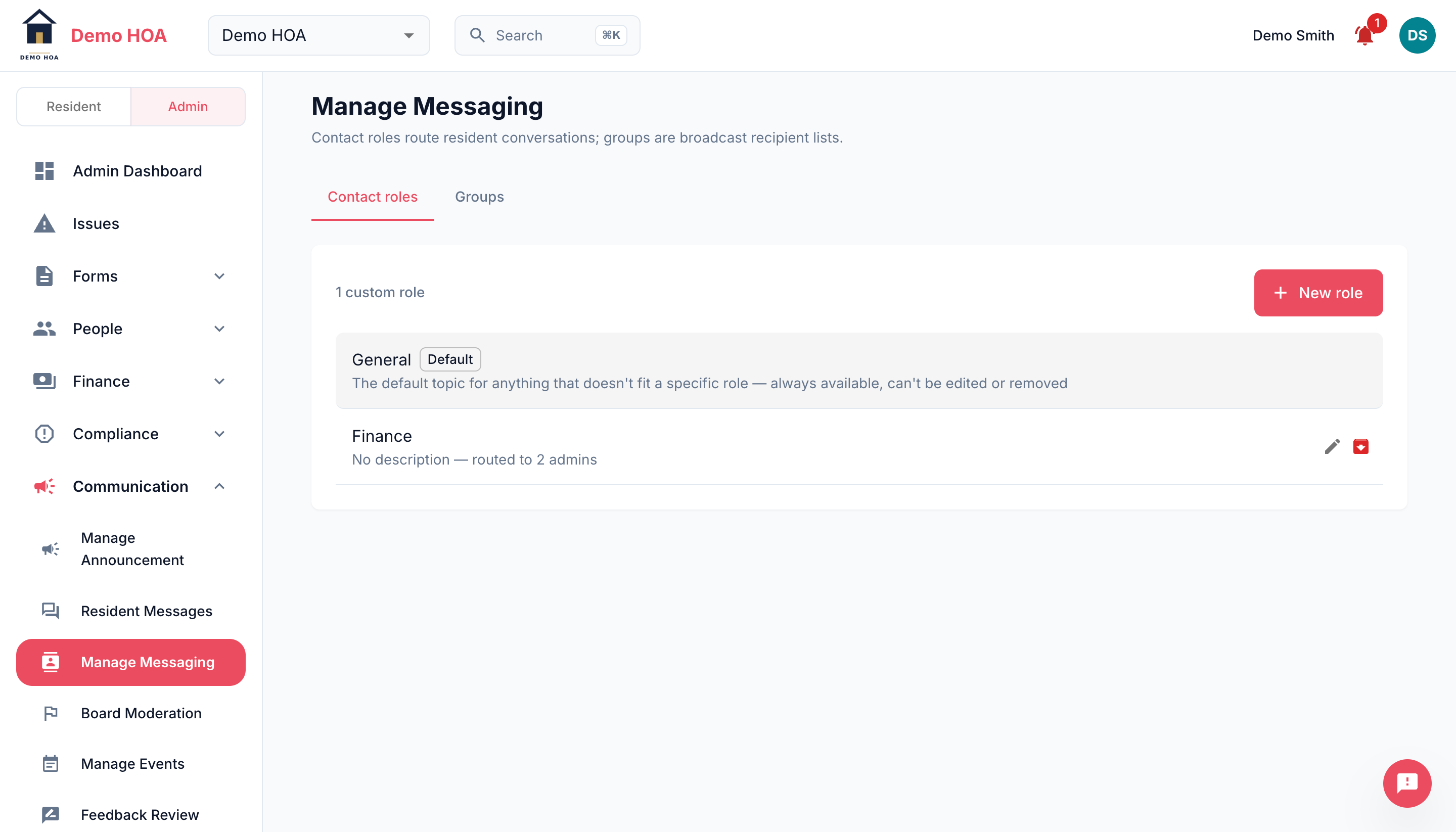 General is labelled Default and has no edit or delete control. Custom roles report how many admins they route to.
Archive a role you no longer use rather than deleting it, so its history survives.
Groups
A group is a set of members you send to as a unit: the board, building C, the pool committee. Add and remove members by email.
There is also a built-in Full Residents group whose membership is the live roster. You cannot edit it, because it edits itself.
Broadcasts
Send one message to a whole group. Each recipient gets it in a read-only broadcast feed rather than in their own conversation, so they cannot reply into a thread with two hundred people in it.
A broadcast records the group, the text, the sender and the recipient count.
Broadcast when the message concerns a defined subset. Use an announcement when it concerns everybody: an announcement is a notice board that people can come back to, and a broadcast is a message that arrives once.